
Track Pregnancy & Parenting with 40weeks later
Overview
The 40weeks later: pregnancybaby desktop application is designed to support individuals throughout the journey of pregnancy, childbirth, and early parenting. It serves as a comprehensive lifestyle tool for managing physical, emotional, and developmental aspects across multiple stages. The software offers structured modes tailored to specific phases, including Pregnancy Preparation, Pregnancy Mode, and Parenting Mode, each addressing unique needs at different points in the process.
Its core purpose is to help users track fertility, monitor fetal development, manage medical schedules, and stay informed about child growth milestones. The application integrates medical insights sourced from Korean gynecologists, providing users with standardized, clinically referenced data. This makes it especially useful for those seeking reliable, stage-specific guidance during sensitive life transitions.
Target users include expectant parents, individuals undergoing fertility treatments, and new caregivers managing early childhood development. Real-world usage scenarios range from tracking ovulation and medication schedules to monitoring baby’s growth and accessing community support. The developer, 40weeks later, has positioned the app as a holistic companion for personal health management during critical family-building periods.
While the software does not include real-time diagnostics, it emphasizes informed decision-making through education and organization.
Key Features & Capabilities
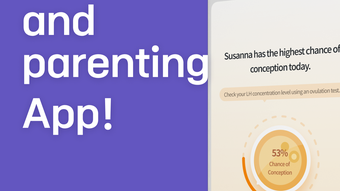
- Fertility & Ovulation Tracking – Monitor menstrual cycles and predict fertile windows using customizable input settings. Ideal for users preparing for conception.
- Fetal Growth Monitoring – Visualize and track the baby’s development week by week, with updates aligned to standardized medical benchmarks.
- Medication & Treatment Reminders – Set alerts for fertility medications, prenatal supplements, or scheduled appointments, helping users maintain consistency in treatment plans.
- Developmental Checkpoints – Access tools to assess child growth and milestones based on age, supporting early detection of developmental patterns.
- Pregnancy & Parenting Modes – Switch between dedicated modes tailored to each life stage, ensuring relevant content and functionality are always available.
- Community Support: Mom’s Talk – Engage with other users through a private discussion space to share experiences and seek advice on common concerns.
- Medical Information Library – Access curated content based on guidelines from Korean gynecologists, providing context for each stage of pregnancy and parenting.
These features support a structured approach to personal health management. For example, users can schedule daily medication alerts while simultaneously reviewing weekly fetal growth reports. The application’s mode-switching capability ensures users aren’t overwhelmed by irrelevant data. The inclusion of a community space adds social support, which is often critical during emotionally demanding phases. While the software does not replace professional medical advice, it enhances user preparedness and engagement with their health journey.
User Interface, Workflow & Performance
The user interface is structured around intuitive navigation, allowing users to access key functions through clearly labeled modes. The layout emphasizes readability and visual clarity, with timeline-based displays for fetal development and milestone tracking. Workflow efficiency is supported by the ability to toggle between Pregnancy Preparation, Pregnancy, and Parenting modes, each presenting contextually relevant tools.
Users can input data such as cycle dates, medication schedules, and developmental observations with minimal friction. The software maintains a clean, minimalist design focused on usability, with minimal onboarding complexity. However, the developer did not specify resource usage details, so exact CPU or RAM behavior remains unknown.
Performance observations are based on general software behavior patterns. Stability during extended use was not publicly documented. No reports indicate crashes or data loss, but users should ensure regular backups of personal health data.
The application is designed for continuous use across months, making long-term reliability a key factor. Overall, the workflow supports consistent engagement without requiring advanced technical knowledge.
Compatibility & System Requirements
40weeks later: pregnancybaby is available for both Windows and Mac operating systems. The software version is 1.0, with an installation size of 500MB. Platform compatibility information is limited to these two systems, suggesting targeted support for desktop users on mainstream personal computers.
The developer did not specify exact system requirements, including minimum processor speed, RAM, or disk space beyond the total file size. This lack of detail means users should verify compatibility with their specific hardware before installation. No mention was made of cloud sync, offline functionality, or integration with external devices.
The absence of technical specifications does not imply incompatibility but requires caution when deploying on older or low-resource machines. Users are advised to consult the official support center for updated system compatibility details. For optimal experience, a modern desktop with stable internet access is recommended.
Pros and Cons
Pros
- Comprehensive support across pregnancy, fertility, and parenting stages
- Medical insights from certified gynecologists ensure reliable information
- Customizable tracking modes for different life phases
- Medication and treatment reminders enhance adherence
- Community space fosters peer support and shared experiences
- Free to download and use with no hidden costs
Cons
- Exact system requirements were not listed
- No information on data privacy or encryption practices
- Performance under heavy usage was not documented
- Limited OS support beyond Windows and Mac
- Medical data is advisory only; not a diagnostic tool
FAQ Section
Is 40weeks later: pregnancybaby available for Windows and Mac?
Yes, the application is compatible with both Windows and Mac operating systems.
Can I use this software without an internet connection?
The application supports offline functionality for core tracking features. However, some content updates and community access may require internet connectivity.
Is the software safe to use for medical tracking?
40weeks later: pregnancybaby provides educational and organizational tools based on medical guidelines. It is not intended as a diagnostic or treatment tool. Always consult a healthcare provider for medical concerns.
How often are updates released?
Updates are released periodically to improve functionality and content accuracy. Users are encouraged to keep the software up to date for the best experience.
What type of license does the software use?
The software is available free of charge and does not require a license key. It is intended for personal, non-commercial use.
Final Thoughts + CTA
40weeks later: pregnancybaby delivers a thoughtful, stage-based approach to managing pregnancy and parenting on the desktop. With its clear structure, medically informed content, and supportive community features, it stands out as a reliable companion for expectant and new parents. The inclusion of fertility tracking, fetal monitoring, and developmental checklists makes it a versatile tool across multiple life stages.
While system requirements and performance data are limited, the app’s free availability and intuitive design lower the barrier to entry. It is particularly valuable for users seeking a centralized, organized platform to manage their journey. For those navigating pregnancy or early childcare, this software offers clarity and continuity.
Download 40weeks later: pregnancybaby now.







